Quick answer
A forex position size calculator tells you how big a trade to take so you only risk a set amount. It uses: Position size = (Account x Risk%) / (Stop in pips x pip value). Risking 1% of a $10,000 account on a 50-pip EUR/USD stop means trading 0.2 lots.
Introduction
Most blown accounts share one cause: positions that were simply too big. Deciding how much to risk per trade – and translating that into an exact lot size – is the job of a position size calculator, and it is arguably the most important tool a trader can master. Get it right and no single loss can hurt you; get it wrong and one bad trade can undo months of work.
This guide explains the position size calculator forex traders depend on: why sizing matters, the formula behind it, the inputs it needs, and how to use it, with verified worked examples. It is educational content, not financial advice, and every number has been checked.
Why Position Sizing Is the Backbone of Risk Management
You can control three things on a trade: where you enter, where your stop sits, and how big your position is. Of these, position size is the master switch for risk, because it decides how many rupees or dollars a given stop-loss actually costs you. A position size calculator ties these together so that every trade risks the same small, pre-decided amount – the essence of consistent risk management.
Without it, traders tend to pick a round lot size out of habit, meaning their risk swings wildly from trade to trade. With it, risk becomes constant and controlled regardless of the setup.
What Is a Position Size Calculator?
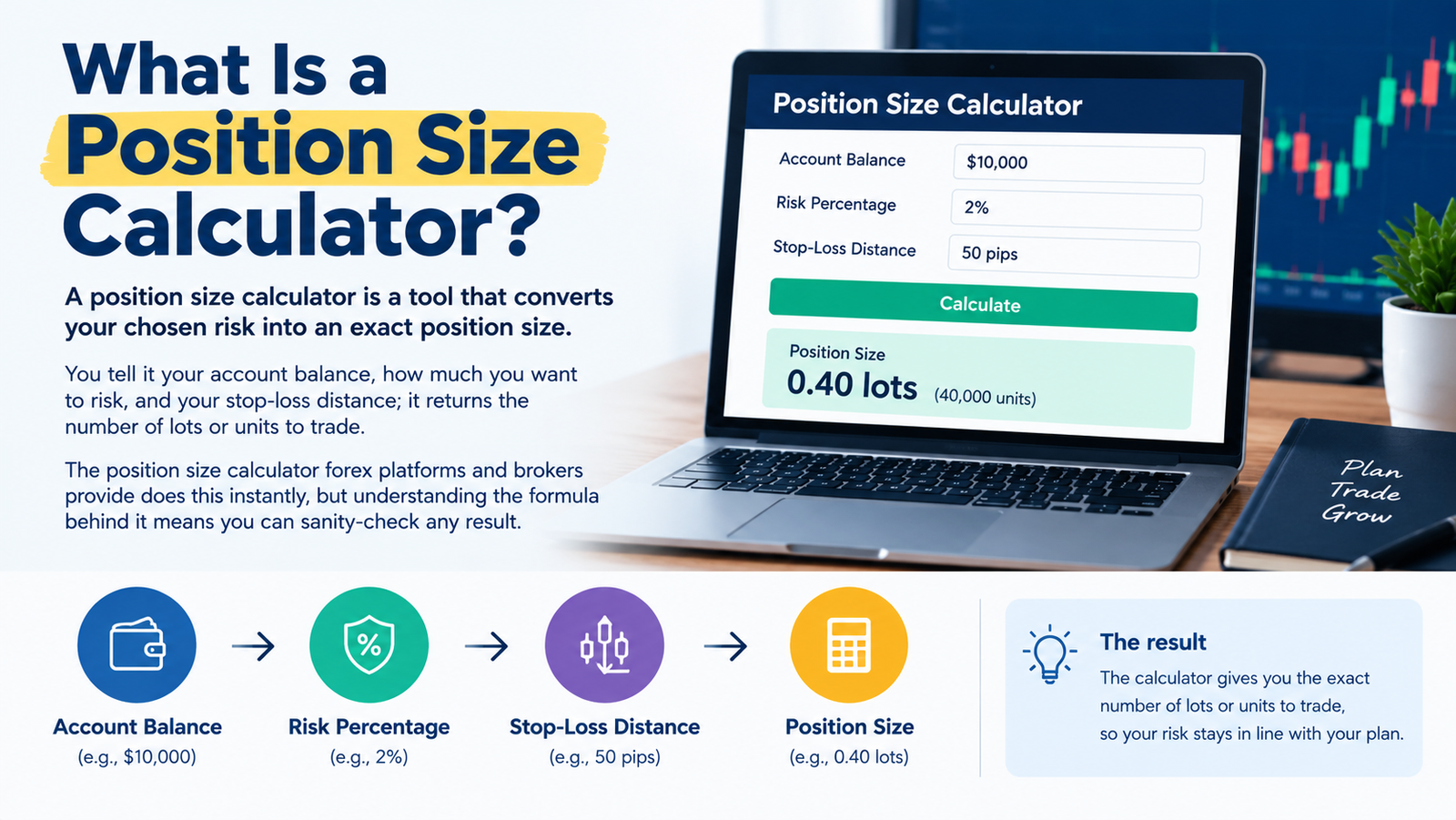
A position size calculator is a tool that converts your chosen risk into an exact position size. You tell it your account balance, how much you want to risk, and your stop-loss distance; it returns the number of lots or units to trade. The position size calculator forex platforms and brokers provide does this instantly, but understanding the formula behind it means you can sanity-check any result.
The Position Size Formula
Every position size calculator applies the same core formula:
Position size (lots) = (Account x Risk%) / (Stop in pips x Pip value per lot)
The three parts are your risk amount (account x risk%), your stop distance in pips, and the pip value for the pair. Multiply the last two to get the risk per lot, then divide your risk amount by it. That is the whole calculation.
Inputs a Position Size Calculator Needs
- Account balance – your current trading capital.
- Risk percentage – how much of the account to risk on this trade (commonly 1-2%).
- Stop-loss in pips – the distance from entry to your stop.
- Currency pair and account currency – so the tool uses the correct pip value and conversion.
Open your forex trading account today!
How to Use a Position Size Calculator (Step by Step)
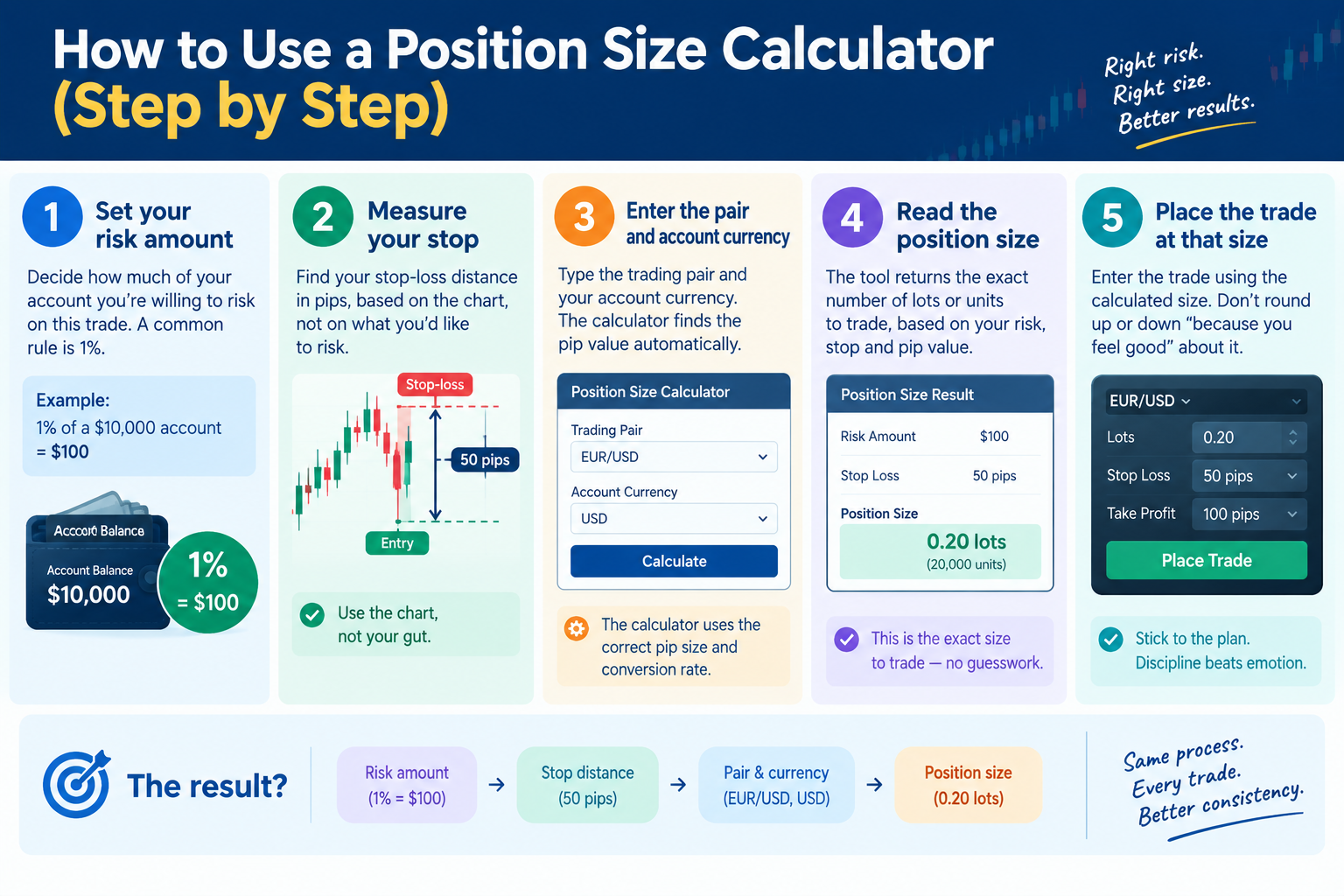
- Set your risk amount – e.g. 1% of a $10,000 account is $100.
- Measure your stop – in pips, based on the chart, not on what you’d like to risk.
- Enter the pair and account currency – the calculator finds the pip value.
- Read the position size – the tool returns the exact lots or units to trade.
- Place the trade at that size – no rounding up ‘because you feel good’ about it.
Worked Example 1: The Baseline
Account $10,000, risking 1%, with a 50-pip stop on EUR/USD (pip value $10 per standard lot):
Risk amount = 10,000 x 1% = $100
Risk per lot = 50 pips x $10 = $500
Position size = 100 / 500 = 0.2 lots (2 mini lots)
Check: 0.2 x $10 x 50 pips = $100
So you trade 0.2 of a standard lot and risk exactly $100 if the stop is hit. That is what a position size calculator does on every trade.
Worked Example 2: Bigger Risk, Tighter Stop
Same $10,000 account, but risking 2% with a tighter 25-pip stop on EUR/USD:
Risk amount = 10,000 x 2% = $200
Risk per lot = 25 pips x $10 = $250
Position size = 200 / 250 = 0.8 lots
Check: 0.8 x $10 x 25 pips = $200
A tighter stop and a higher risk allowance both push the position size up. This is why the calculator matters – the ‘right’ size is different on every trade.
How Stop Distance Changes Your Position Size
A key insight the position size calculator forex traders use makes obvious: at a fixed risk amount, a tighter stop allows a bigger position, and a wider stop forces a smaller one. Here is $100 of risk on EUR/USD across different stops:
| Stop-loss (pips) | Risk amount | Position size |
|---|---|---|
| 10 pips | $100 | 1.0 standard lot |
| 20 pips | $100 | 0.5 standard lots |
| 50 pips | $100 | 0.2 standard lots |
| 100 pips | $100 | 0.1 standard lots |
Notice the risk stays fixed at $100 throughout – only the size changes. That is the whole point of sizing to risk rather than guessing a lot size.
How Much Should You Risk Per Trade?
The most common guideline is the 1-2% rule: risk no more than 1-2% of your account on any single trade. On a $10,000 account that is $100-$200 per trade. Keeping risk small means even a long losing streak barely dents your capital – and it removes the emotional pressure that wrecks decision-making. Beginners are usually best served by staying at or below 1%.
Position Sizing, Pip Value and Risk-Reward Together
A position size calculator sits at the centre of three linked ideas. Pip value tells you what a pip is worth; the stop-loss tells you how many pips you’re risking; and the risk percentage tells you the money on the line. Combine them and you get the size. Layer a healthy risk-reward ratio on top, and you have a complete, repeatable risk framework – the same one used by disciplined professionals.
Common Mistakes
- Picking a lot size out of habit instead of calculating it from risk.
- Setting the stop to fit a desired size, rather than sizing to a chart-based stop.
- Risking too high a percentage – the fastest way to blow an account.
- Forgetting pip value differs by pair and account currency.
- Rounding the position size up ‘because this one looks good’.
Myths vs Facts
| Myth | Fact |
|---|---|
| Position size should be the same each trade. | It should vary so risk stays constant as the stop changes. |
| A bigger account means bigger risk %. | The percentage stays small; only the dollar amount scales. |
| Tighter stops are always safer. | A tighter stop allows a bigger size and can be hit more easily. |
| You can size by feel. | Sizing to a fixed risk with a calculator is what keeps losses controlled. |
Risk disclaimer
This article is for educational purposes only and is not investment advice. Forex trading carries a high risk of loss, and most retail traders lose money. Examples are simplified and exclude spread, commission and slippage. Consult a licensed financial adviser before trading.
Expert Analysis
If there is one habit that reliably separates traders who last from those who don’t, it is sizing every trade to a fixed fraction of capital. A position size calculator makes that habit effortless, but its real value is conceptual: it forces you to decide your risk before you think about reward, which is the correct order. Amateurs ask ‘how much could I make?’ and pick a size that excites them; professionals ask ‘how much can I lose, and what size keeps that loss at my fixed limit?’ – and let the calculator answer.
The stop-versus-size table above holds the deepest lesson. Because risk is held constant while size flexes with the stop, a trader using a position size calculator never has to fear a wider stop – they simply trade smaller. This decouples the quality of a trade idea from the danger of the trade, so a valid setup with a distant, sensible stop is no riskier than one with a tight stop. Over hundreds of trades, that discipline is what allows a genuine edge to compound instead of being wiped out by a single oversized position.
Key Takeaways
- A position size calculator converts your chosen risk into an exact lot size.
- Formula: Position size = (Account x Risk%) / (Stop in pips x pip value per lot).
- Risking 1% of $10,000 on a 50-pip EUR/USD stop means 0.2 lots.
- At a fixed risk, a tighter stop allows a bigger position and vice versa.
- Stick to the 1-2% rule and size to a chart-based stop, never by feel.
Frequently Asked Questions (FAQ)
Q: What is a position size calculator?
A: A tool that converts your chosen risk into an exact position size, using your account balance, risk percentage and stop-loss distance.
Q: How much should I risk per trade?
A: A common guideline is 1-2% of your account per trade, keeping any single loss small enough to absorb a losing streak.
Q: How do I calculate position size in forex?
A: Divide your risk amount (account x risk%) by the stop in pips times the pip value per lot to get the position size.
Q: What is the position size formula?
A: Position size (lots) = (Account x Risk%) / (Stop in pips x pip value per lot).
Q: How does stop-loss distance affect position size?
A: At a fixed risk, a tighter stop allows a larger position and a wider stop forces a smaller one; risk stays constant.
Q: What inputs does a position size calculator need?
A: Account balance, risk percentage, stop-loss in pips, and the currency pair plus account currency for pip value.
Q: What is the 1% rule?
A: Risking no more than 1% of your account on any single trade, so a run of losses cannot seriously damage your capital.
Q: Should position size be the same every trade?
A: No. It should change so that the money risked stays the same even as your stop distance varies.
Q: Does account size change my risk percentage?
A: No. The percentage stays small and constant; only the dollar risk amount grows as the account grows.
Q: How does pip value fit into position sizing?
A: Pip value sets the risk per pip, so the calculator multiplies it by your stop in pips to find the risk per lot.
Q: Can I use a position size calculator for any pair?
A: Yes, as long as you set the correct pair and account currency so it uses the right pip value and conversion.
Q: Is a tighter stop safer?
A: Not necessarily – it allows a bigger position and can be triggered more easily by normal market noise.
Q: How do I size a trade on a small account?
A: The same formula applies; small accounts often use micro lots to keep risk within 1-2%.
Q: Does leverage change position size?
A: Leverage affects the margin required, not the risk-based position size; size to your risk, not your available leverage.
Q: Where can I find a position size calculator?
A: Most brokers and platforms like TradingView, MetaTrader and myfxbook offer one free; the formula also works in a spreadsheet.