If you looking forward to start Forex trading on MT4 or MT5 platforms, It’s important for you to know how to calculate pips in Meta Trader which helps you in setting stop loss, calculating pip profit in Meta Trader or optimising your position size by estimating the present risk in the forex market. That’s why it’s non-negotiable for you to know how to calculate pips in MetaTrader for a successful trading career.
In this blog we will go through all the basics of master pip calculations on MetaTrader 4 and MetaTrader 5 that can help you in your forex trading journey using the pip indicator MT5/MT4 tools.
What Are Pips in Forex Trading?
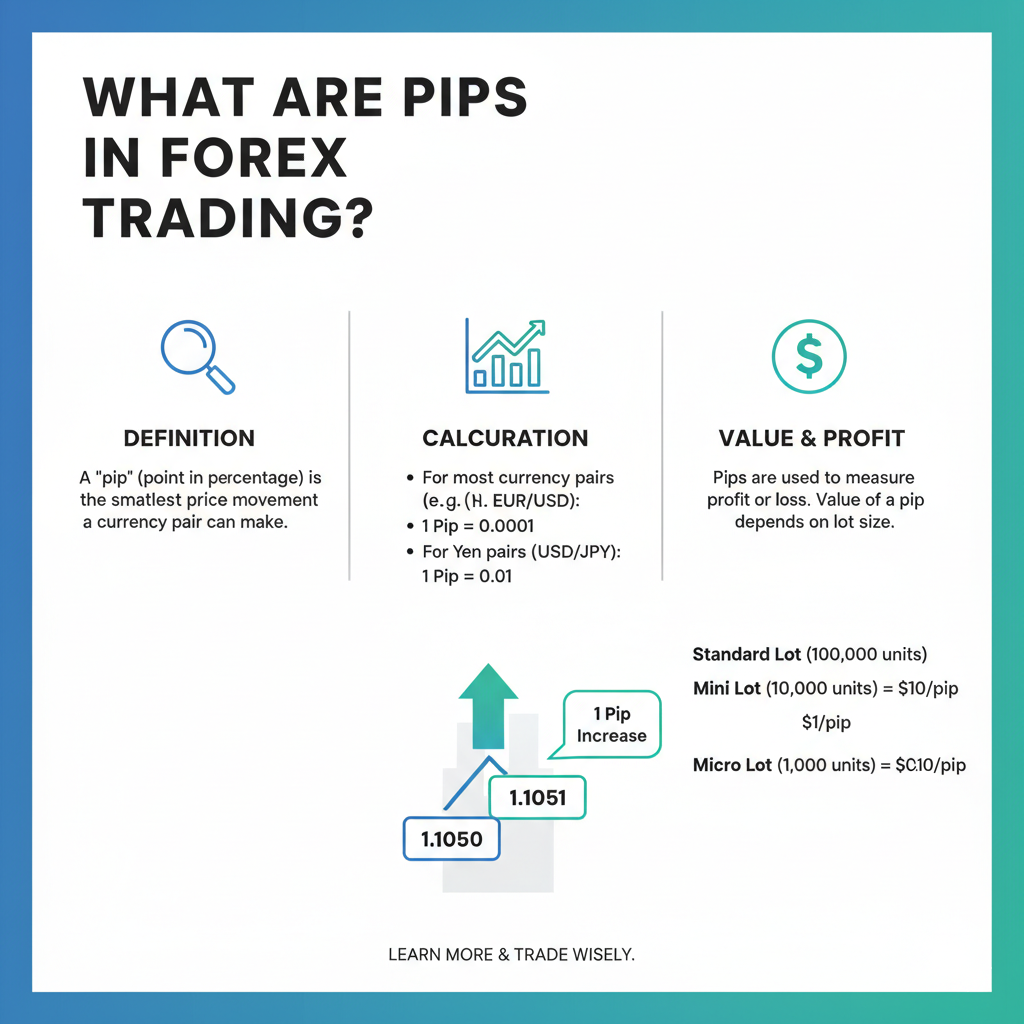
In forex trading, a pip refers to “percentage in point” or “price interest point.” It is the standardised unit used to measure how much a currency pair’s price changes in one market movement.
In the forex market, a pip is traditionally a change of 0.0001 for most currency pairs — except the Japanese yen pairs, where one pip = 0.01.
Examples:
- If EUR/USD moves from 1.1000 to 1.1005 → it has moved 5 pips
- For USD/JPY, a movement from 144.10 to 144.60 → 50 pips
- For XAU/USD (Gold), a movement from 1925.00 to 1930.00 → 500 points (equivalent to 50 pips in forex terms)
Key pip-related terms every trader must know:
| Term | Meaning |
|---|---|
| Pip | Smallest standard price move (0.0001 for most pairs) |
| Pipette | 1/10th of a pip — the 5th decimal place |
| Point | MetaTrader’s internal unit (1 pip = 10 points in MT4/MT5) |
| Pip Value | Monetary value of one pip based on lot size |
| Pip Profit | Total profit/loss = pip movement × pip value |
Understanding how to calculate pips in MetaTrader helps you measure market volatility, set accurate stop loss and take profit levels, and manage risk effectively.
Common Confusion: MetaTrader displays prices in points, not pips. For major forex pairs, 1 pip = 10 points on the MT4/MT5 platform. Always divide the displayed point value by 10 to get the pip count.
Why Pip Calculation Matters in MetaTrader
When you trade on MetaTrader 4 (MT4) or MetaTrader 5 (MT5) it becomes more convenient to do pip value calculation, as pip value helps in determining:
- The required pip value for lot size chosen by you for your trade.
- The expected profit or losses in the trade due to price movement in the market.
- It helps you determine the exact margin you would need for the size of leverage amount in your account.
- The present risk and award ratio in the trade for better money management.
Whether you’re calculating pip profit in MetaTrader manually or using an inbuilt pip indicator in MT5, knowing how to convert pip movement into monetary value improves your trading precision.
What Factors Affect Pip Value?
Before diving into calculation steps, understand that pip value is not fixed — it changes based on three key variables:
1. Currency Pair Type
- Major pairs (EUR/USD, GBP/USD): pip = 0.0001
- JPY pairs (USD/JPY, EUR/JPY): pip = 0.01
- Exotic pairs (USD/ZAR, USD/TRY): pip = 0.0001 but higher spread cost
2. Lot Size Your lot size directly multiplies or shrinks pip value. A micro lot trader risking the same pip count as a standard lot trader is risking 100× less capital.
3. Account Base Currency If your account is in USD and you’re trading EUR/USD, pip value is straightforward. But if your account is in INR or another currency, the pip value converts through the current exchange rate, making a forex pip calculator essential before placing any trade.
Risk Tip: Never calculate pip value mentally when trading gold (XAU/USD), indices (US30, NAS100), or crypto. These assets use different point values per lot — always use an online pip calculator or the broker’s built-in tool.
Understanding How to Calculate Pips in MetaTrader (MT4/MT5)
The process of pip calculation depends on:
- The currency pair you’re trading
- Your lot size (standard, mini, micro)
- The account currency
Let’s explore step-by-step how to calculate pips in MetaTrader.
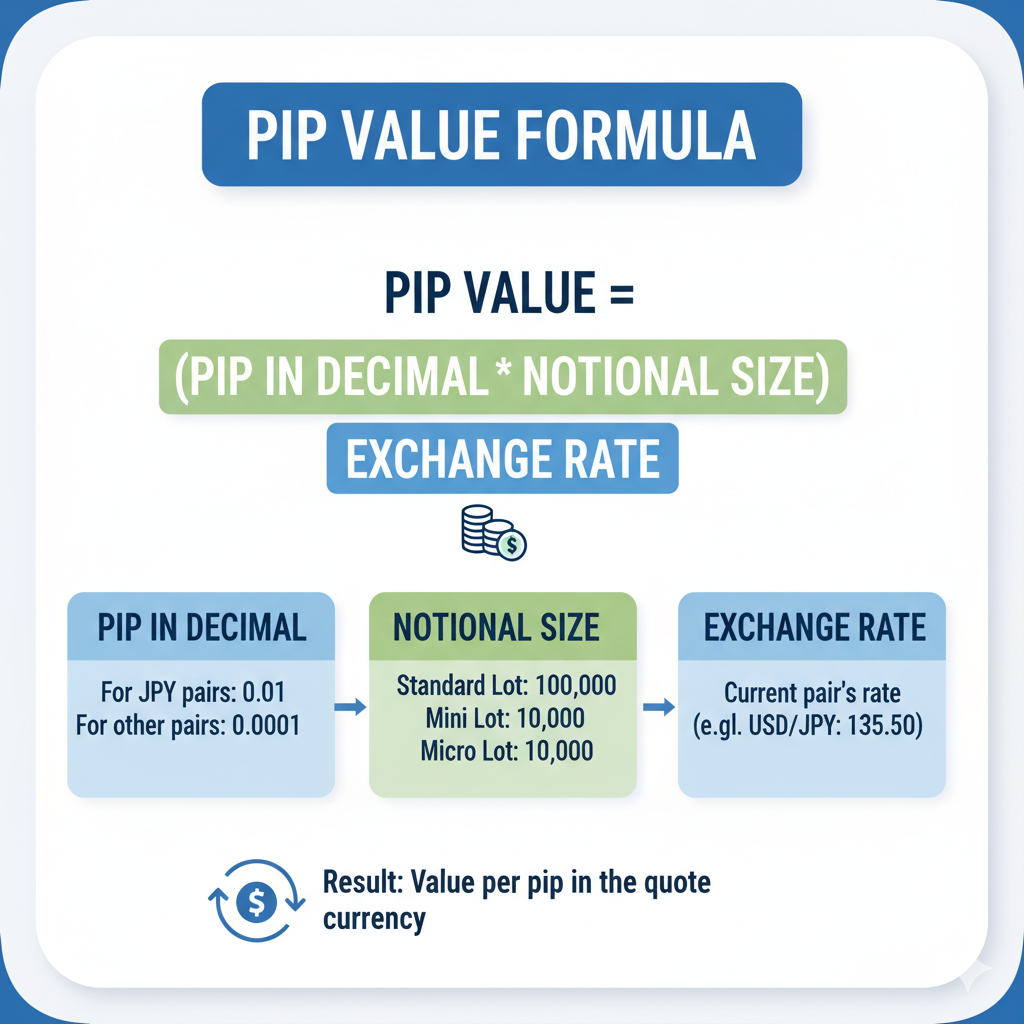
Step 1: Identify the Pip Value Formula
For most pairs (like EUR/USD or GBP/USD), pip movement is measured up to 4 decimal places. In yen pairs (like USD/JPY), it’s measured up to 2 decimal places.
The general formula for pip calculation is:
Pip Value = 1 pip × Lot Size
Exchange Rate
For standard pairs, 1 pip = 0.0001.
For yen pairs, 1 pip = 0.01.
Example:
If you trade 1 standard lot (100,000 units) of EUR/USD at 1.1000:
Pip Value = 0.0001 × 100,000 =9.09 USD per pip
1.1000
Thus, each pip movement equals $9.09 in profit or loss depending on trade direction.
Step 2: Apply It in MetaTrader 4
In MT4, you can calculate pips manually using your trade size, instrument type, and price difference.
Steps:
- Open your MT4 terminal and go to the “Trade” tab.
- Identify the entry and current/exit price.
- Subtract the entry from the current price to find the pip difference.
Example: (1.1050 – 1.1000 = 0.0050 = 50 pips). - Multiply this pip difference by pip value per lot to estimate profit/loss.
You may also use the MT4 crosshair tool for instant pip measurement.
Step 3: Perform the Same in MetaTrader 5
On MT5, pip calculations follow identical principles:
- Enable the crosshair tool (press the middle mouse wheel or Ctrl+F).
- Drag between two price points. The middle figure displayed shows pips.
- To compute monetary value, multiply pip count by your pip value derived from the formula.
Moreover, MT5 offers pip indicators that automatically show pip movement, profit targets, and stop-loss in real time.
Here are both additions with exact placement instructions.
MT4 vs MT5 Pip Calculation — Key Differences
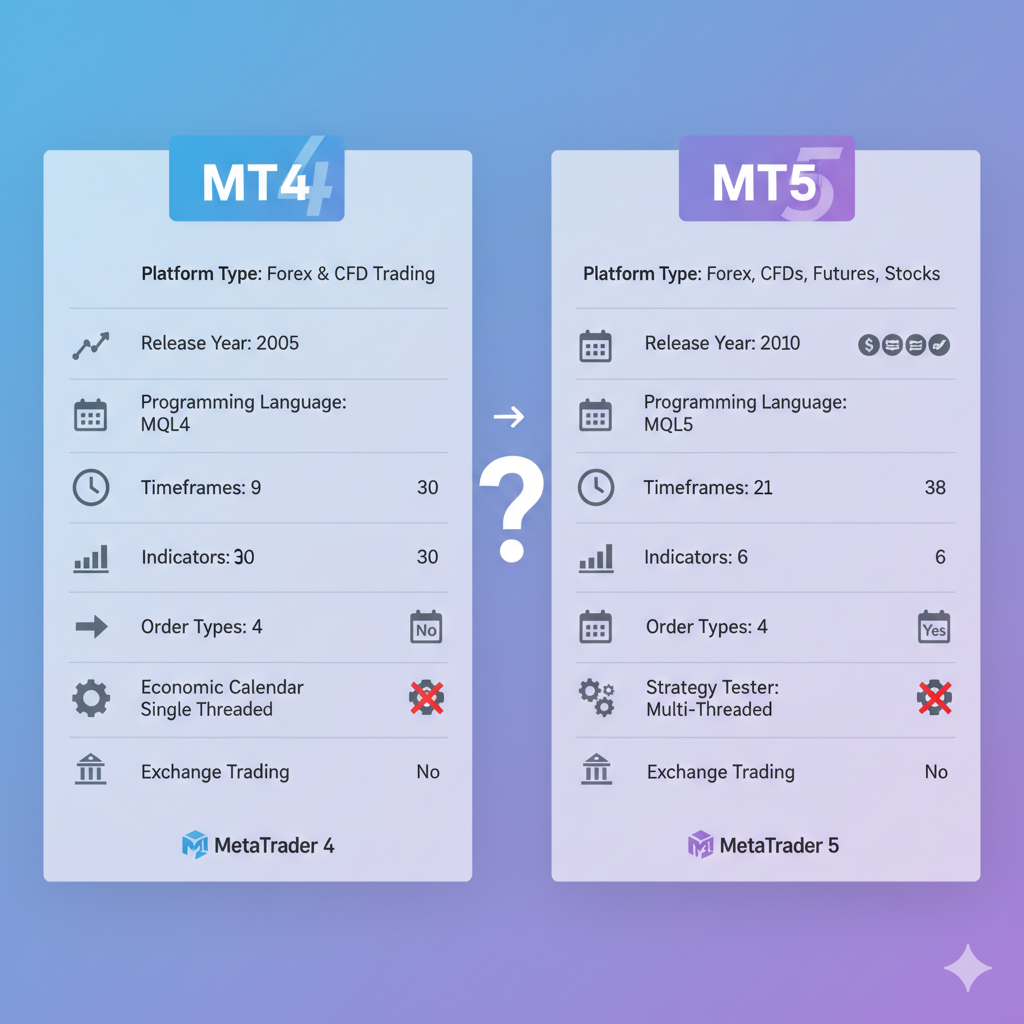
Both platforms calculate pips using the same mathematical formula, but they differ in how they display, measure, and support pip-related tools. Choosing the wrong platform for your trading style can affect how efficiently you calculate pip value and manage risk in real time.
| Feature | MT4 | MT5 |
|---|---|---|
| Decimal display | 4 or 5 decimal places | 4 or 5 decimal places |
| Crosshair tool | Middle mouse button hold | Ctrl+F or toolbar icon |
| Point display | Shows points — divide by 10 for pips | Shows points — divide by 10 for pips |
| Pip value indicators | Available via Marketplace | More options, better compatibility |
| Asset coverage | Forex and CFDs primarily | Forex, indices, commodities, crypto, stocks |
| Built-in calculator | Not available natively | Not available natively |
| MQL language | MQL4 — pip calculation in EAs | MQL5 — faster, more precise EA execution |
| Depth of Market | Not available | Available — helps understand pip movement pressure |
| Timeframes available | 9 timeframes | 21 timeframes — more precise pip range analysis |
| Strategy Tester | Single-threaded | Multi-threaded — faster pip-based backtesting |
Which platform is better for pip calculation?
For pure forex pip calculation on major and minor pairs, MT4 remains widely used due to its simplicity and the large library of existing pip value indicators. For traders working across gold, indices, crypto, and stocks, MT5 is the stronger choice — its broader asset coverage means pip and point calculations are handled more consistently across instrument types within a single platform.
For Indian traders accessing global markets through offshore brokers, MT5 is increasingly the default platform offered, making familiarity with its crosshair tool and pip indicator ecosystem particularly important. You can read the complete MT4 vs MT5 execution comparison to understand how platform differences affect not just pip calculation but also fill quality and slippage on live trades.
Real Trade Walkthrough — Pip Calculation Applied End to End
Understanding the formula is one thing. Seeing it applied to a complete real trade before entry is what separates disciplined traders from guesswork traders. Here is a full worked example using every pip calculation concept covered in this guide.
Trade Setup Details:
- Pair: EUR/USD
- Account size: $3,000 USD
- Risk per trade: 1% = $30 maximum loss
- Entry price: 1.1050
- Stop loss price: 1.1030
- Take profit price: 1.1090
Step 1 — Calculate Stop Loss Distance in Pips
Stop Loss Distance = Entry − Stop Loss Price = 1.1050 − 1.1030 = 0.0020 = 20 pips
Step 2 — Calculate Pip Value for Chosen Lot Size
Using 1 mini lot (10,000 units) of EUR/USD at 1.1050:
Pip Value = (0.0001 × 10,000) ÷ 1.1050 = $0.905 per pip ≈ $1.00 per pip (standard broker rounding for mini lot)
Step 3 — Calculate Maximum Lot Size Based on Risk
Max Lot Size = Account Risk ÷ (Stop Loss Pips × Pip Value per Lot) = $30 ÷ (20 × $1.00) = 1.5 mini lots (0.15 standard lots)
This means you can trade 0.15 lots and if the stop loss is hit, your maximum loss is exactly $30 — 1% of your account.
Step 4 — Calculate Take Profit Distance in Pips
Take Profit Distance = Take Profit Price − Entry Price = 1.1090 − 1.1050 = 0.0040 = 40 pips
Step 5 — Calculate Expected Pip Profit
Pip Profit = Take Profit Pips × Pip Value × Lots = 40 × $1.00 × 1.5 = $60 expected profit
Step 6 — Confirm Risk-Reward Ratio
Risk = $30 | Reward = $60 Risk-Reward Ratio = 1:2
Summary of This Trade:
| Element | Value |
|---|---|
| Pair | EUR/USD |
| Entry | 1.1050 |
| Stop Loss | 1.1030 (20 pips) |
| Take Profit | 1.1090 (40 pips) |
| Lot Size | 0.15 lots |
| Max Risk | $30 (1% of account) |
| Expected Profit | $60 |
| Risk-Reward | 1:2 |
| Pip Value Used | $1.00 per pip per mini lot |
This workflow — pip distance → pip value → lot size → profit target → risk-reward — should be completed before every single trade entry regardless of the instrument. For faster execution of this exact workflow, use the pip calculator for step 2, the position size calculator for step 3, the pip profit calculator for step 5, and the risk reward calculator for step 6 — all in under 60 seconds before placing your order.
Pro Tip: Save this workflow as a checklist in your trading journal. Traders who complete all six steps before entry make significantly fewer position sizing errors and maintain more consistent risk per trade across changing market conditions. For building a complete pre-trade routine around this, refer to the pre-market trading routine guide and the single setup trading plan for a structured daily framework.
How to Use the Crosshair Tool for Pip Measurement in MT4 & MT5
The crosshair tool is the fastest built-in method to measure pip distance between two price points on a chart — without manual calculation.
In MT4:
- Hold the middle mouse button on your chart
- Drag from your entry price point to your target or stop price
- The display shows three numbers — the middle value is the pip/point count
- Divide by 10 for most major pairs to get actual pip value
In MT5:
- Press Ctrl+F or click the crosshair icon in the toolbar
- Click your start price → drag to end price
- MT5 displays bars elapsed, pip distance, and price difference simultaneously
When to use it:
- Setting stop loss distance before entering a trade
- Measuring the size of a recent price swing or candle range
- Quickly checking risk-reward ratio visually before placing an order
This is especially useful when trading fast-moving instruments like XAU/USD (Gold) or US30, where manual pip counting mid-trade causes costly delays.
Pip Calculation for Different Lot Sizes
Lot size affects pip value significantly.
| Lot Type | Size (units) | Approx. Pip Value (EUR/USD) |
| Micro | 1,000 | $0.10 |
| Mini | 10,000 | $1.00 |
| Standard | 100,000 | $10.00 |
When trading smaller accounts, using mini or micro lots keeps pip value manageable, reducing risk exposure.
How Pip Value Connects to Risk Management
Understanding pip value per lot is only useful when connected to actual risk management rules. Here’s how professional traders link them:
Step 1 — Define account risk percentage Most traders risk 1–2% of account capital per trade. On a $5,000 account: max risk = $50–$100 per trade.
Step 2 — Set your stop loss in pips Example: You set a 30-pip stop loss on EUR/USD.
Step 3 — Calculate maximum lot size
Max Lot Size = Account Risk ÷ (Stop Loss in Pips × Pip Value) = $100 ÷ (30 × $10) = 0.33 lots
This is why pip value calculation directly determines position sizing — without it, you’re guessing your real risk exposure.
For automated calculation, use a position size calculator or forex risk calculator before every trade entry. For traders managing multiple open trades, a risk exposure calculator helps prevent over-leveraging across positions simultaneously.
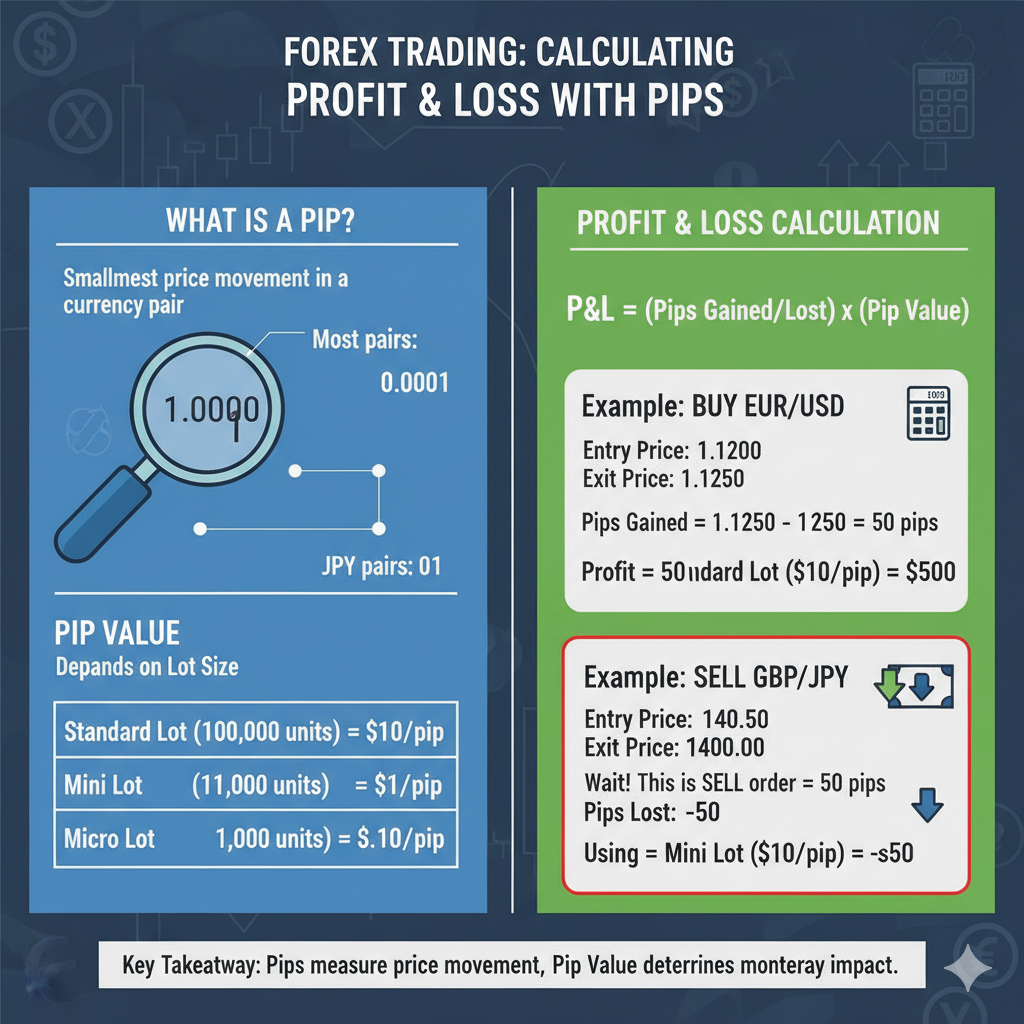
Pip Calculation for Different Asset Classes
While forex is the primary domain of pip usage, you may also calculate pips (or points) across other assets on MetaTrader 4/5.
| Asset Class | Typical Value Term | Example Calculation |
| Forex | Pip | EUR/USD change from 1.1000 to 1.1050 = 50 pips |
| Gold (XAU/USD) | Point | 1925.00 to 1930.00 = 500 points ($5 change) |
| Indices | Point | SPX500 from 4400 to 4450 = 50 points |
| Crypto | Ticks | BTC/USD from 27000 to 27100 = 100 ticks |
The calculation structure remains similar but uses asset-specific value increments.
Pip Value Calculation: Manual Formula vs MetaTrader Tools
Traders often debate whether to calculate pip value manually or rely on platform tools. Here’s a clear breakdown:
| Method | Speed | Accuracy | Best For |
|---|---|---|---|
| Manual formula | Slow | High (if done correctly) | Learning, verification |
| MT4/MT5 crosshair | Fast | Medium (shows points, not pips) | Quick trade planning |
| Pip value indicator MT5 | Instant | High | Active/intraday traders |
| Online pip calculator | Instant | High | Pre-trade planning across pairs |
| Broker calculator | Instant | Exact | Commodities, indices, crypto |
For standard forex pip calculation, the manual formula is sufficient. But for gold pip calculation (XAU/USD), indices like NAS100, or crypto pip values, always use a dedicated calculator — the contract sizes differ significantly.
Formula Recap:
For counter currency ≠ account currency:
Pip Value = (0.0001 / Exchange Rate) × Lot Size × Account Currency Conversion Rate
For USD-based accounts trading EUR/USD (1 standard lot):
Pip Value = (0.0001 / 1.1000) × 100,000 = $9.09 per pip
For USD/JPY (1 standard lot):
Pip Value = (0.01 / 144.50) × 100,000 = $6.92 per pip
This demonstrates why USD/JPY pip calculations require special attention — the pip value is lower than most major pairs despite similar price movements.
MT4 vs MT5 Pip Calculation — Key Differences
Both platforms calculate pips using the same mathematical formula, but they differ in how they display, measure, and support pip-related tools. Choosing the wrong platform for your trading style can affect how efficiently you calculate pip value and manage risk in real time.
| Feature | MT4 | MT5 |
|---|---|---|
| Decimal display | 4 or 5 decimal places | 4 or 5 decimal places |
| Crosshair tool | Middle mouse button hold | Ctrl+F or toolbar icon |
| Point display | Shows points — divide by 10 for pips | Shows points — divide by 10 for pips |
| Pip value indicators | Available via Marketplace | More options, better compatibility |
| Asset coverage | Forex and CFDs primarily | Forex, indices, commodities, crypto, stocks |
| Built-in calculator | Not available natively | Not available natively |
| MQL language | MQL4 — pip calculation in EAs | MQL5 — faster, more precise EA execution |
| Depth of Market | Not available | Available — helps understand pip movement pressure |
| Timeframes available | 9 timeframes | 21 timeframes — more precise pip range analysis |
| Strategy Tester | Single-threaded | Multi-threaded — faster pip-based backtesting |
Which platform is better for pip calculation?
For pure forex pip calculation on major and minor pairs, MT4 remains widely used due to its simplicity and the large library of existing pip value indicators. For traders working across gold, indices, crypto, and stocks, MT5 is the stronger choice — its broader asset coverage means pip and point calculations are handled more consistently across instrument types within a single platform.
For Indian traders accessing global markets through offshore brokers, MT5 is increasingly the default platform offered, making familiarity with its crosshair tool and pip indicator ecosystem particularly important. You can read the complete MT4 vs MT5 execution comparison to understand how platform differences affect not just pip calculation but also fill quality and slippage on live trades.
Why Traders Use MetaTrader
MetaTrader is a globally used and preferred electronic trading tool for forex, commodities, indices, stocks, and cryptocurrencies, developed by MetaQuotes Software. It’s trusted by traders and brokers all around the world due to its rich analytical tools, technical indicators, and features that enable effective market monitoring and trade execution.
Key Features of MetaTrader
- Charting and Technical Analysis: MetaTrader provides advanced charting tools and more than 30 built-in technical indicators, which help traders analyze price movements and trends with accuracy.
- Automated Trading: The platform supports automated trading via “Expert Advisors” (EAs), which are custom trading algorithms programmed using the MQL4/MQL5 languages.
- Multi-Asset Support: MetaTrader enables traders to make trade across a broad range of markets – Forex, CFDs, commodities, stocks, and crypto.
- Order Types and Execution: Supports market, limit, stop-loss, and take-profit orders, and allows various trading modes including instant, market, and exchange execution.
MT4 vs MT5
- MetaTrader comes in two main versions: MT4 and MT5. MT4 is more precisely designed for forex and CFDs, whereas MT5 is used to support additional asset classes and offers enhanced analytic and trading fundamentals.
- MetaTrader is available in various modes like desktop, mobile, and web interfaces, which make them accessible for different types of users and trading environments.
Additional Resource: Insightful Trade Guide
If you want to deepen your understanding of MetaTrader beyond pip calculation, the Insightful Trade platform covers everything from MT4 setup for Indian traders and forex order types to algorithmic trading basics and building a trading plan. Whether you are a beginner learning platform navigation or an experienced trader optimising execution and risk systems, the guides cover practical, actionable knowledge for real trading conditions.
Best Pip Calculators and Tools for MetaTrader Users
Once you understand the theory, the right tools accelerate your trading decisions significantly. Here are the most effective options for MetaTrader traders:
- Built-in MT4/MT5 Tools The crosshair tool gives visual pip measurement between price points. The one-click trading panel shows pip distance to stop and target in real time. The Strategy Tester backtests EA performance measured in pips.
- Third-Party Pip Indicators for MT5/MT4 The pip value indicator MT5 displays live pip value on chart for your current pair and lot size. The ATR indicator measures average pip range per candle — essential for setting an accurate ATR-based stop loss. Risk/reward overlay tools visually draw your trade setup with pip labels directly on the chart.
- Online Calculators (Use Before Entering Any Trade) Use the pip calculator for instant pip value across any currency pair and lot size. The forex pip profit calculator calculates profit and loss from pip movement. To convert pip count directly to monetary value, the pips to dollars calculator gives instant results. Track expected price movement ranges with the pip movement calculator, and confirm required margin for your lot size using the forex margin calculator before every trade.
Pro Workflow: Before entering any trade → Use a pip calculator to confirm pip value → Use a position size calculator to confirm lot size → Use a risk/reward calculator to confirm the setup is worth taking.
For pair-specific calculations, dedicated tools exist for GBP/JPY, EUR/USD, XAU/USD, BTCUSD, and WTI crude oil.
Practical Tips for Pip Calculation
- Always make sure to verify the number of decimal places used for the given currency pair as most of the pairs use four or five decimals except the JPY pair which uses two only.
- Use crosshair tool indicators provided in MetaTrader to quickly measure pip value between two price points and make sure to divide the points by 10 to get the result in pip values for forex pairs.
- Use the automated pip value calculators or install pip-value indicator MT5/MT4 to avoid manual mistakes, especially in the case of large or multiple lot sizes.
Common Mistakes to Avoid
1. Confusing Points and Pips MetaTrader displays price movement in points, not pips. For major currency pairs, 1 pip = 10 points on both MT4 and MT5. So when the crosshair tool shows “50 points,” your actual pip movement is only 5 pips. This single misread causes traders to massively overestimate profit targets and stop loss distances. Always divide the MetaTrader point value by 10 to get your real pip count before calculating any monetary value.
2. Misinterpreting Decimal Placement Using the correct decimal place is critical. A move from 1.2000 to 1.2020 in EUR/USD is 20 pips — not 200. Beginners frequently miscount by one decimal position, which leads to incorrect pip profit calculations and dangerously oversized positions. The rule is simple: count from the 4th decimal place for all major pairs. The 5th decimal (pipette) is ignored for standard pip measurement. Before placing any trade, double-check your pip distance using the pip difference calculator to eliminate manual counting errors entirely.
3. Ignoring Currency Pair Variations Most traders learn pip calculation on EUR/USD and then blindly apply the same logic to every instrument — which leads to serious errors. JPY pairs (USD/JPY, GBP/JPY) use 2 decimal places where 1 pip = 0.01, not 0.0001. Gold (XAU/USD) moves in points where $1.00 = 100 points. Indices like US30 and NAS100 use their own point values per contract. Applying EUR/USD logic to USD/JPY pip calculation, gold pip calculation, or NAS100 pip values will produce completely wrong position sizes and risk amounts.
4. Not Recalculating Pip Value When Switching Pairs Pip value is not universal — it changes every time you switch instruments. A trader who sizes a 0.5 lot position on EUR/USD and carries that same lot size to GBP/JPY without recalculating is unknowingly taking on different risk per pip. Always recalculate pip value per lot when switching pairs, especially when moving between forex majors, exotic pairs, and commodities. Use a dedicated forex pip calculator for each instrument before entering.
5. Ignoring Spread in Pip Profit Calculation Your pip profit in MetaTrader is calculated from entry price — but your real entry on a buy order is at the ask price, which already includes the spread. On a pair with a 2-pip spread and a 10-pip profit target, your net pip gain is only 8 pips. Traders who ignore spread consistently overestimate profitability, especially on scalping strategies and short-term trades where spread is a significant percentage of the total pip target. Factor spread into every pip profit calculation before evaluating a setup.
6. Using Demo Pip Values to Judge Live Performance Demo accounts in MetaTrader use idealised pricing with minimal spreads and instant fills. In live trading, spread costs, slippage, and broker execution differences mean your real pip results will consistently differ from demo results. A strategy averaging 20 pips on demo may only net 15–16 pips live after real market conditions. Never set pip targets or evaluate a strategy’s viability solely based on demo account performance.
7. Not Adjusting Pip Value for Account Base Currency Traders with non-USD accounts (INR, EUR, GBP, AED) must convert pip value from USD to their account currency using the current exchange rate. Skipping this step produces incorrect position sizing, unexpected margin usage, and risk amounts that don’t match your intended percentage. This mistake is especially common among Indian traders using offshore brokers, where the INR/USD conversion significantly changes the actual rupee risk per pip on every trade.
FAQs On How To Calculate Pips In MetaTrader
Q1. How is a pip different from a point in MetaTrader?
A pip and a point are related but not the same thing. MetaTrader measures and displays all price movement internally in points — the smallest possible price increment on the platform. For most major forex currency pairs, 1 pip = 10 points. So if MetaTrader’s crosshair tool shows a movement of 150 points between two price levels, your actual pip distance is 15 pips. This distinction matters enormously when setting stop loss distances and calculating pip profit in MetaTrader — using point values directly without dividing by 10 will make every distance appear 10 times larger than it actually is.
Q2. How do I calculate pip value for Gold or indices in MT4/MT5?
Gold (XAU/USD) and indices like US30, NAS100, and SP500 have different contract sizes and price increment structures compared to standard forex pairs, which makes manual pip calculation unreliable for these instruments. The most accurate method is to use your broker’s built-in margin or pip calculator, as contract specifications vary between brokers. Alternatively, use a dedicated gold pip calculator for XAU/USD, a US30 pip calculator for the Dow Jones index, or a NAS100 pip calculator for tech index trades — each tool accounts for the exact contract size and point value of that specific instrument.
Q3. Is there a pip indicator for MT5?
Yes. MT5 supports downloadable pip value indicators available directly from the MetaTrader Marketplace inside the platform. Once installed, these indicators display the live pip value for your current chart instrument and selected lot size directly on screen — updating automatically as exchange rates shift. This eliminates manual calculation entirely during active trading sessions. Some advanced versions also show stop loss distance in pips, risk amount in account currency, and suggested lot size based on your pre-set risk percentage, making them a practical tool for position sizing and real-time risk management without leaving the chart.
Q4. What is the easiest way to calculate pips in MetaTrader?
The fastest built-in method is the crosshair tool. In MT4, hold the middle mouse button and drag between two price points on your chart — the middle number displayed is the point distance, which you divide by 10 to get pips for major pairs. In MT5, press Ctrl+F to activate the crosshair, then drag between price levels to see the pip distance instantly. For monetary value, multiply the pip count by your pip value per lot using the standard formula, or feed the result directly into a pip profit calculator for your account currency. This method is especially useful for quickly measuring risk-reward ratios and checking stop loss distances before entering a trade.
Q5. How can I calculate pip profit in MetaTrader faster?
The quickest method is installing a pip value calculator or profit calculator indicator from the MetaTrader Marketplace — these tools calculate and display your open trade’s pip profit in real time directly on the chart without any manual input. For pre-trade planning, use an online forex pip profit calculator where you enter your entry price, exit price, lot size, and currency pair to get an instant profit figure in your account currency. For traders who want to convert a known pip count into dollar profit, a pips to dollars calculator gives the fastest result — enter pip count, lot size, and pair, and the monetary value is calculated immediately.
Q6. What is a pipette and how is it different from a pip?
A pipette is one-tenth of a pip — the 5th decimal place on most currency pairs (3rd decimal on JPY pairs). MetaTrader 4 and MT5 both display prices to 5 decimal places by default, meaning the last digit shown is always a pipette. For all standard pip value calculations, stop loss settings, and pip profit calculations, use the 4th decimal place as your pip reference and ignore the 5th. Pipettes matter primarily for tight scalping strategies where fractional pip differences in entry and exit affect overall profitability across high trade frequency.
Q7. How do I calculate pip profit for a closed trade in MetaTrader?
Open your MT4 or MT5 History tab under the Terminal window. Find the closed trade and note the entry price and exit price. For a buy trade, subtract entry from exit. For a sell trade, subtract exit from entry. The result in decimal form divided by 0.0001 (or 0.01 for JPY pairs) gives your total pip count. Multiply that by your pip value per lot and by the number of lots traded to get total pip profit in your account currency. MetaTrader also shows the final profit figure directly in the History tab, but calculating the pip count separately helps you assess strategy performance independently of lot size variations across different trades.
Q8. How many pips per day do professional traders typically target?
Most professional intraday forex traders target between 10–50 pips per day depending on strategy type and the pairs traded. Scalpers target 5–15 pips per trade across multiple setups daily. Day traders focus on 20–50 pips from fewer, higher-conviction setups per session. However, raw pip targets are far less important than risk-reward ratio — a 15-pip target with a 10-pip stop is a stronger setup than a 50-pip target with a 45-pip stop. Always evaluate setups through a risk reward calculator rather than targeting a fixed pip number, and connect your pip target to a defined trading plan before entering any position.
MetaTrader Pip Calculation: Quick Reference Summary
| Scenario | Formula / Tool |
|---|---|
| Basic pip value (major pairs) | (0.0001 × Lot Size) ÷ Exchange Rate |
| JPY pair pip value | (0.01 × Lot Size) ÷ Exchange Rate |
| Gold (XAU/USD) pip value | $1 per pip per standard lot |
| Measure pips on chart (MT4/MT5) | Crosshair tool → divide result by 10 |
| Points vs pips (MT4/MT5) | 1 pip = 10 points |
| Position size from risk | Account Risk ÷ (Stop Loss Pips × Pip Value) |
| Pip profit of closed trade | Pip movement × Pip value × Lots |
| Automated calculation | Pip value indicator MT5 / EA / online calculator |
For real-time calculation across all instruments, bookmark the Insightful Trade Pip Calculator — it covers forex majors, minors, exotics, gold, indices, and crypto pairs with instant results based on your lot size and account currency.
Conclusion
Knowledge about how to calculate Pips in MetaTrader is important in making every trading decision. To be a safe trader in the forex market you need accurate information about profit levels, risk management and position sizing, for that calculating pips either manually or through automatic Pip indicator MT5 setup is non negotiable.
With the correct knowledge about pip profit in MetaTrader you can clearly differentiate between speculative and strategic trading. By calculating pip value, lot size, profit levels or stop-loss before placing a trade, you can take control of your trade and be prepared for the outcome in advance.
To Win your trades you must win over the mystery of pips—so learn, practice and use pip calculation consistently in real life trading for better understanding.
Author: Arihant Jain
Trading Experience: 5+ Years
Arihant Jain is a financial markets analyst and trading educator with expertise in Forex, Indices, Crypto, and risk-managed trading systems. His insights are based on real trading experience, data-driven analysis, and transparent market understanding. All content is reviewed for accuracy and aligns with Google’s EEAT guidelines.
Risk Disclaimer:
Trading involves substantial risk. All information is for educational purposes only and should not be taken as financial advice. Always do your own research.
Last Updated: 9 March 2026